Loading…
AI Image Prompt
Turn your itinerary into an AI travel image, thumbnail or cover
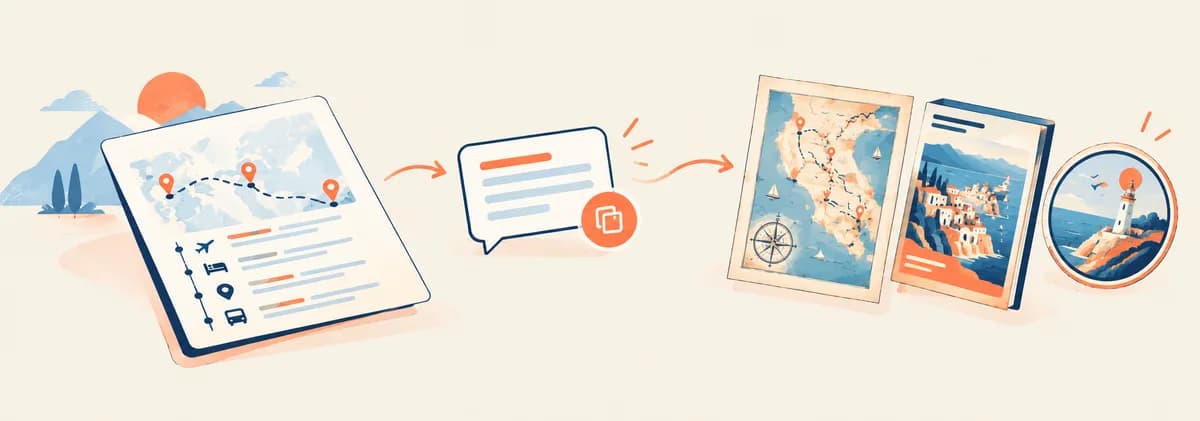
TripSet reads your trip data and builds a ready-to-use prompt for the top AI image tools. Pick one of 12 visual styles, choose your format, copy — and paste into Midjourney, GPT Image, FLUX or any other generator.
This is a feature inside TripSet's trip planner — build your itinerary first (or copy one from Explore), then generate the prompt. Free to sign up.
Try it free
Works in all modern browsers · No upload required
How it works
1. Open your itinerary
Go to any itinerary in TripSet and click "Trip Infographic" in the header. Switch to the AI Prompt tab.
2. Choose a visual style
Pick one of 12 styles — from vintage map poster to cinematic poster to kawaii guide. The prompt updates instantly.
3. Select places (optional)
Use the place pills to include or exclude specific stops. The prompt adapts to your selection automatically.
4. Copy and generate
Click "Copy prompt" and paste it into Midjourney, GPT Image, Nano Banana Pro or any other AI image tool.
Need somewhere to run the prompt?
SYNTX is one subscription with 100+ AI models. For images it has Nano Banana, GPT Image, Flux, Grok Imagine, Ideogram and Seedream; for video, Kling, Veo and Runway. Paste your TripSet prompt into any of the image models. The free plan has no time limit and starts with 5 tokens.
12 visual styles
Each style generates a different type of AI image — from illustrated maps to sketchbook pages to retro posters. Click a preview to open it full size.
Timeline
A vertical day-by-day visual timeline of the trip — each day block shows places, transport, and hotel. Clean editorial layout with country color palette.
Vintage Map Poster
A 1960s National Geographic-style illustrated travel poster with a hand-drawn country outline, route line connecting stops in visit order, and retro typography.
City Poster
A vibrant retro travel poster for a specific city — 2-3 iconic landmarks, local transport, food and streetscape in a scrapbook collage with bold "HELLO [City]" typography.
Double Exposure
A premium travel magazine cover with a double-exposure effect — landmarks, landscapes and culture blended into the silhouette of an iconic landmark. Warm matte cinematic lighting.
Cute Doodle
Scattered hand-drawn doodle illustrations of landmarks, food, and transport across the canvas. Playful, coloring-book style with pastel fills.
Comic Guide
A designer travel guide poster mixed with comic illustration — sections for what to see, eat, do, and a mini-map. Smart and witty tone, shareable aesthetic.
Kawaii Guide
Japanese kawaii-style per-day cards in a flowing grid — Sanrio-inspired chibi characters, pastel watercolor backgrounds, hand-lettered day labels.
Whimsical Watercolor Map
A hand-painted watercolor map of the travel region — loose brushwork geography, cities marked with red pins connected by a dashed route line in visit order, botanical margin decorations.
Illustrated Map
A colorful flat-illustration map with landmark, food, and culture icons placed at geographic locations. Rifle Paper Co. style, bold saturated palette.
Cinematic Poster
A premium documentary-style travel poster — dramatic golden-hour landscape photograph as full-bleed background, elegant serif title, letterbox bars, film grain and teal-orange color grade. Nat Geo / BBC Earth aesthetic.
Hand-Drawn Route
A personal travel sketchbook page — graphite pencil lines with selective watercolor fills, wobbly route line connecting each day's stops, hand-lettered labels, food and landmark doodles.
Travel Badge
A retro souvenir patch or embroidered badge design — shape adapts to the format (shield, medallion, banner ribbon or postcard stamp), distressed texture, bold vintage typography, landmark silhouettes.
Quick reference
- Output
- Text prompt — copy and paste into any AI image tool
- Visual styles
- 12 (Timeline, Map Poster, City Poster, Double Exposure, Doodle, Comic, Kawaii, Watercolor Map, Illustrated Map, Cinematic Poster, Hand-Drawn, Travel Badge)
- Aspect ratios
- 9:16 (TikTok, Instagram Stories & Reels, YouTube Shorts) · 4:5 (Instagram feed, Pinterest) · 1:1 (Instagram, Telegram, Facebook) · 16:9 (YouTube thumbnails, Twitter/X, blog heroes)
- Works with
- Any AI image tool that accepts text prompts — Midjourney, GPT Image, Nano Banana Pro and more
Frequently asked questions
What is an AI travel image prompt generator?
An AI image prompt generator takes your trip data — destinations, places visited, dates, transport — and turns it into a detailed text description that AI image tools like Midjourney or DALL-E can use to generate a custom travel illustration or map. TripSet's AI Prompt feature does this automatically from your itinerary, with 12 visual styles to choose from.
How do I generate a Midjourney prompt for my travel itinerary?
Open your itinerary in TripSet, go to Trip Infographic → AI Prompt tab, choose the Vintage Map Poster or any other style, and click "Copy prompt". Paste it into the Midjourney /imagine command in Discord. The prompt already includes the --ar flag for the aspect ratio you selected.
Which AI image tools work with these prompts?
The prompts work with every major AI image model — Nano Banana Pro (Gemini 3), GPT Image 2, Midjourney v7, FLUX 2 Max, Qwen Image 2 Pro, Grok Imagine, Ideogram, DALL-E 3, Stable Diffusion and Adobe Firefly. Nano Banana Pro and GPT Image 2 handle our long detailed prompts best; Qwen Image 2 Pro is the pick when your itinerary has Cyrillic or CJK city names. For tools other than Midjourney, remove the --ar flag at the end of the prompt and set the image dimensions separately in the tool's interface.
How does TripSet adapt the prompt to my specific trip?
TripSet reads your itinerary data — countries visited, places in visit order, transport types, dates, and duration — and builds a prompt around your actual route and places, not placeholder examples. Map styles (Vintage Poster, Watercolor, Illustrated) show your actual route with cities in visit order. Cinematic and Double Exposure styles feature a real landmark from your trip.
What visual styles are available?
There are 12 styles: Timeline (day-by-day editorial layout), Vintage Map Poster (1960s National Geographic style), City Poster (vibrant retro city collage), Double Exposure (magazine cover with landmark silhouette), Cute Doodle (playful scattered illustrations), Comic Guide (travel guide + comic hybrid), Kawaii Guide (Japanese kawaii per-day cards), Whimsical Watercolor Map (hand-painted map with route line), Illustrated Map (Rifle Paper Co. flat illustration), Cinematic Poster (documentary-style landscape with letterbox bars), Hand-Drawn Route (sketchbook pencil and watercolor), and Travel Badge (retro souvenir patch — shape adapts to format).
Can I use this for YouTube thumbnails and social media covers?
Yes. All 12 styles support four aspect ratios: 16:9 (YouTube thumbnails, Twitter/X headers, Facebook covers, blog heroes), 9:16 (TikTok covers, Instagram Stories & Reels, YouTube Shorts thumbnails), 1:1 (Instagram feed, Telegram, Facebook posts), and 4:5 (Instagram portrait posts, Pinterest pins). Cinematic Poster and City Poster are especially popular for YouTube thumbnails and blog cover images; Double Exposure and Watercolor Map work well as Instagram covers; Vintage Poster and Kawaii Guide grab attention in TikTok/Reels feeds.
Does the route map show stops in the correct order, and is it geographically accurate?
The prompt explicitly lists stops using arrow notation (City A → City B → City C) and instructs the AI to draw the route line in that sequence — the AI usually respects this order. But the map itself is an artistic interpretation, not a geographically accurate one: city positions and country outlines may not match real-world positions. For a precise map of your trip, use Trip Infographic (which renders from real coordinates) or export to KML/GPX. AI Prompt is designed for shareable artwork, not navigation.
Can I choose which places appear in the prompt?
Yes. Each style shows a set of place pills below the style selector. You can tap any pill to include or exclude specific stops. The prompt regenerates automatically when you change the selection. Each style has a limit on how many places it can include — from 4 (Travel Badge) to 24 (Timeline, Kawaii Guide).
What aspect ratios are supported?
Four formats: 9:16 vertical (1080×1920 px, for Stories and TikTok), 4:5 portrait (for Instagram feed posts), 1:1 square (for feed posts and Telegram), and 16:9 landscape (for Twitter/X, Facebook banners, and desktop wallpapers). The --ar flag is automatically added to the prompt to match your chosen format.
Is the AI Prompt generator free?
Yes. The AI Prompt generator is free in TripSet — no subscription required. Sign up at app.tripset.io, open any itinerary, and access it from the header toolbar under Trip Infographic → AI Prompt.
How is AI Prompt different from Trip Infographic?
Trip Infographic generates an actual PNG image directly in your browser from your itinerary data — no AI required, instant download. AI Prompt generates a text description that you paste into an external AI image tool (Midjourney, DALL-E, etc.) to produce an illustrated or artistic image. Use Trip Infographic for data-accurate stats cards; use AI Prompt when you want a hand-drawn, illustrated, or artistic visual.
Also useful
Trip Infographic →
Generate a PNG infographic directly from your itinerary — route map, day stats, photo grid. No AI tool needed.
Photo Reel →
Turn your trip photos into an MP4 slideshow with Ken Burns motion and cinematic color grades.
Animated route video →
Generate an MP4 of your route moving across a map — 3D camera, multiple formats, no upload.
Publish your trip →
Share the itinerary behind your generated image on Explore, where others can clone it.
Generate your travel thumbnail, cover or image prompt
Free · 12 styles · YouTube, Instagram, TikTok, blog · Works with any AI image tool
Start planning